

Cloud-based HR platform
HR for Everyone on One Platform
Manage your leave, overtime, payroll and performance processes on a single platform; base your decisions on data with powerful reports.
Our References

Sound familiar?
Your HR team spends its time on paperwork, not people
Leave requests sit in email, expense receipts sit in a drawer, employee records live in separate files. Every question turns into a search, every approval into a delay. Yönetim İK brings that scatter together in a single workspace.
- Leave requests get lost between email and chat threads
- Working out who has how much leave left takes half a day
- Expense claims are collected at month end and most arrive incomplete
- Employee records sit in separate files and nobody knows which one is current
- Managers have to wait on HR for approvals
- Whenever a report is asked for, the data has to be pulled together by hand
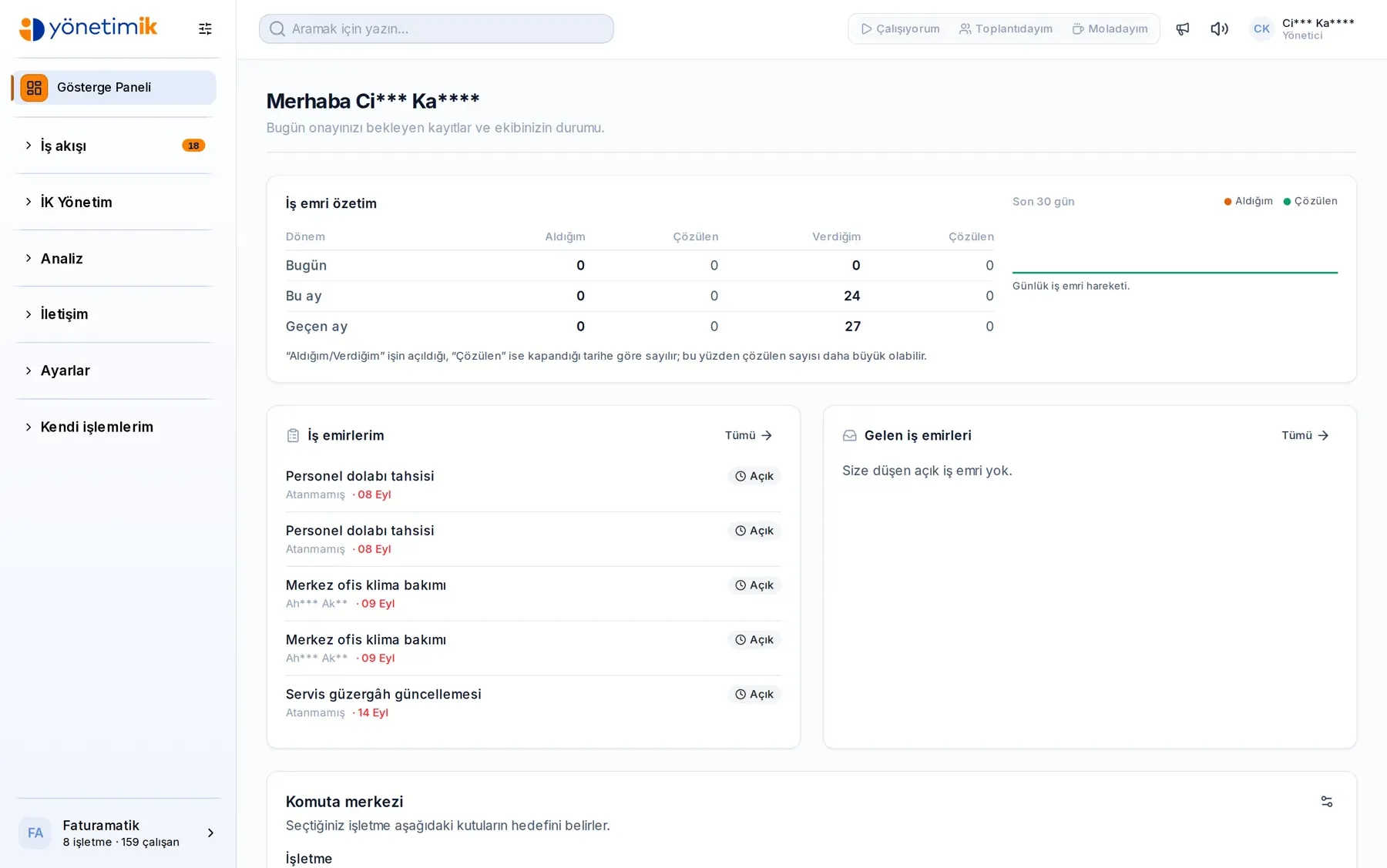
Real Product, Real Screens
Manage all your HR processes from a single intuitive interface with the Yönetim İK panel.
Employee Management
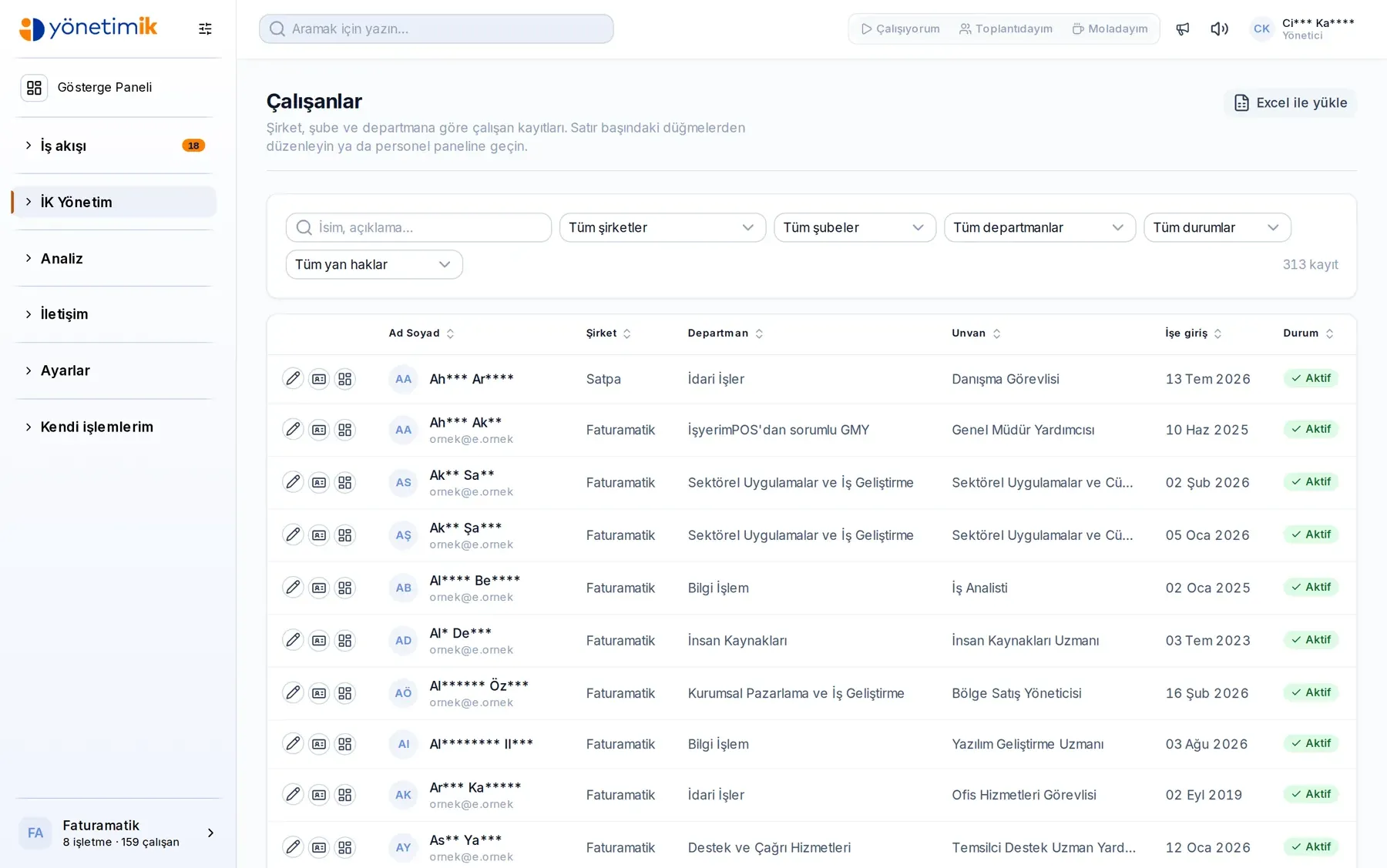
Every employee record in one place
Each employee's personnel record, contact details, job title and reporting department are gathered on a single screen. Filter by company, branch, department and title, and reach the person you need in seconds.
- Filtering by company, branch, department and job title
- Insurance and employment status visible at a glance
- Records can be exported and feed straight into reports
Leave Management
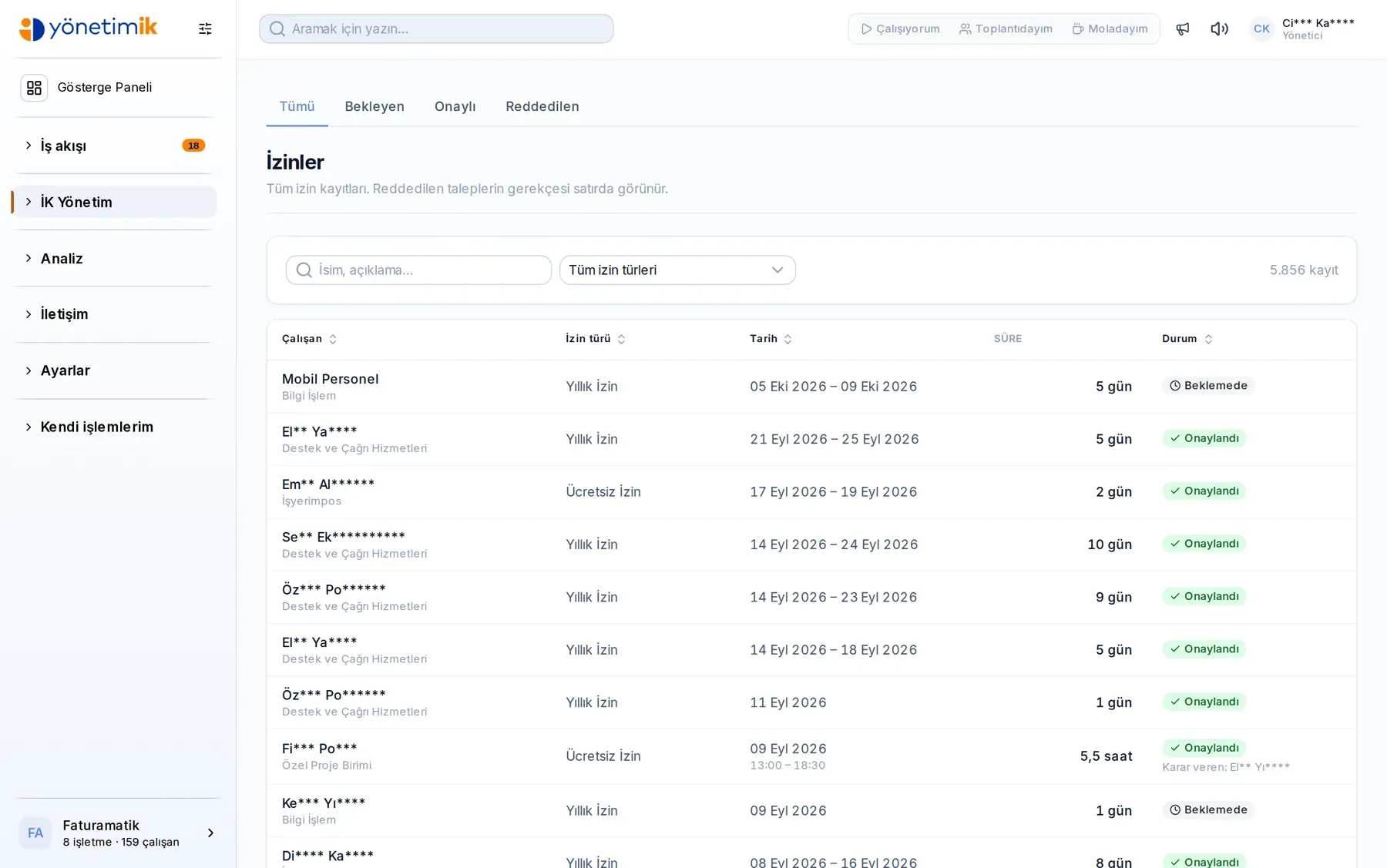
Request, approval and balance in one flow
An employee creates a request in the portal and it reaches their manager immediately. Approved leave is posted to the calendar and the leave balance automatically, so nobody has to be asked how much entitlement is left.
- A single flow from request to approval, with no email traffic
- Leave balances update automatically, with no manual calculation
- Upcoming leave is visible to the whole team on the calendar
Expense Management
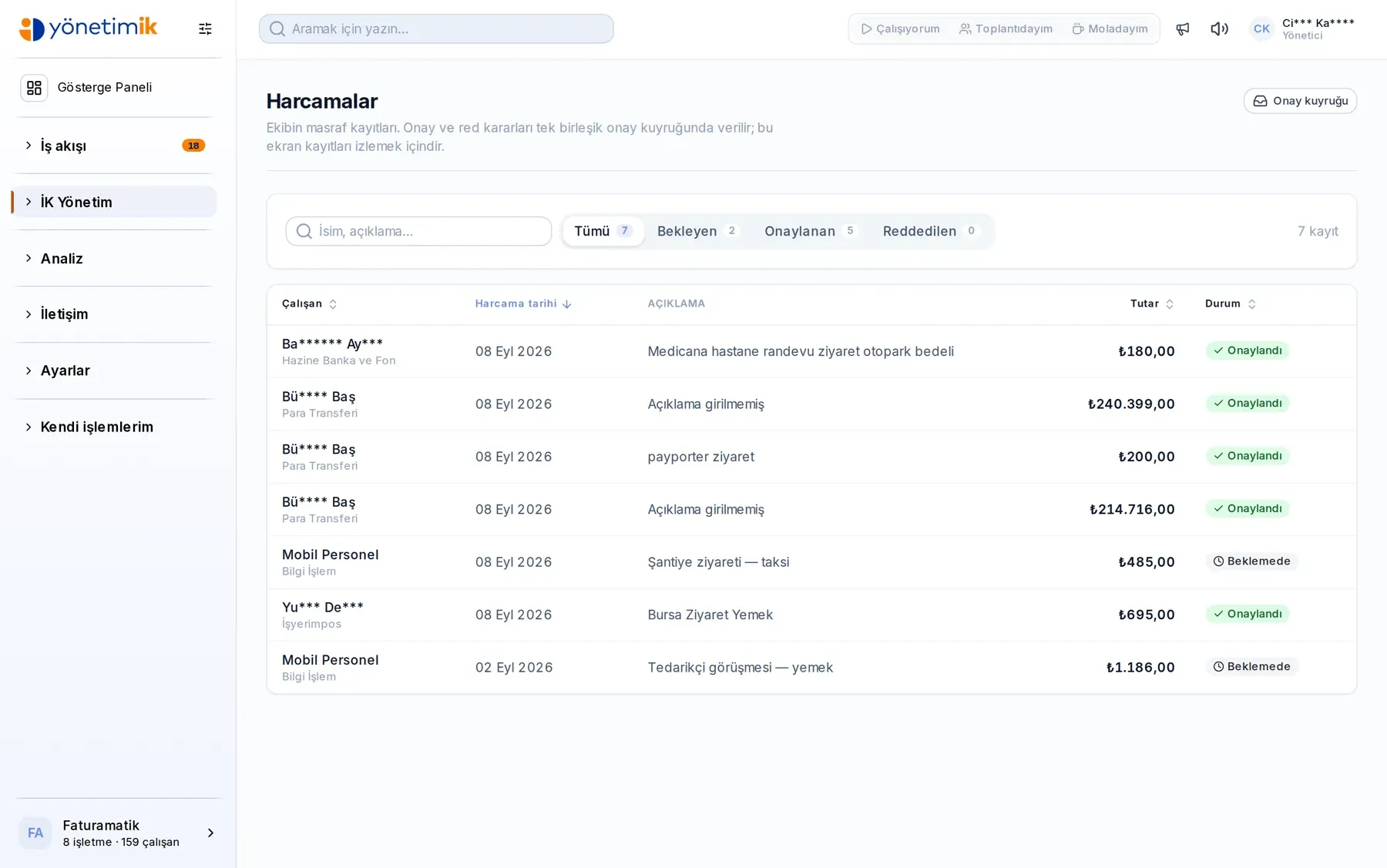
No lost receipts, no month-end surprises
Employees record an expense together with its receipt as it happens. Approval runs through the portal, and amounts, notes and documents stay on the same record. Month-end close stops being a collection exercise.
- Receipt and invoice images are attached to the record
- Approval status can be tracked at every step
- Expenses are reported by department and by period
Reporting
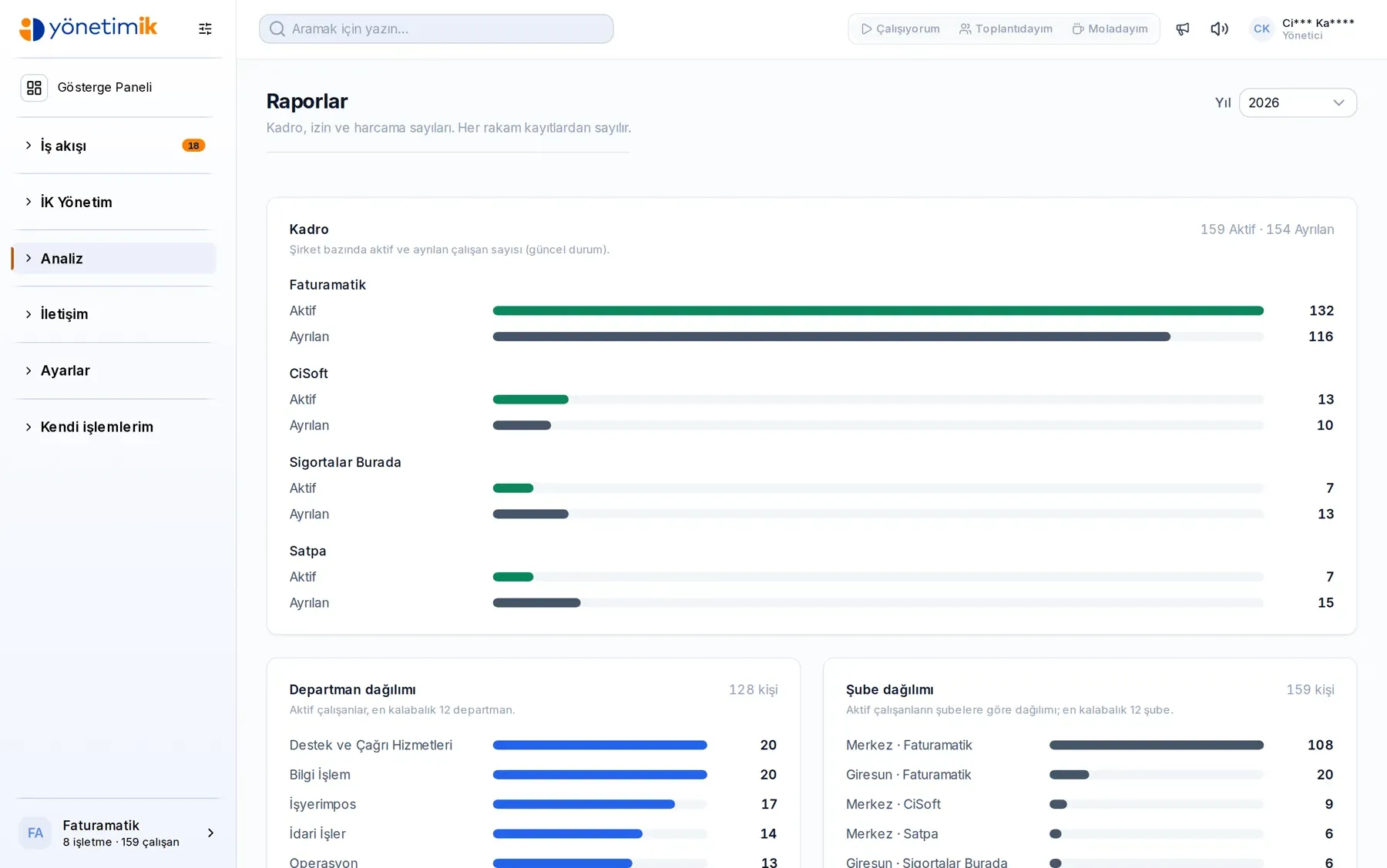
Do not wait on data to make a decision
Headcount distribution, leave usage and expense analysis come as ready-made reports. Before a management meeting you open a screen instead of assembling a table by hand.
- Employee, leave and expense reports come ready-made
- Comparison broken down by company and department
- Results can be exported and carried into a presentation
Work Orders
Field work on the record too
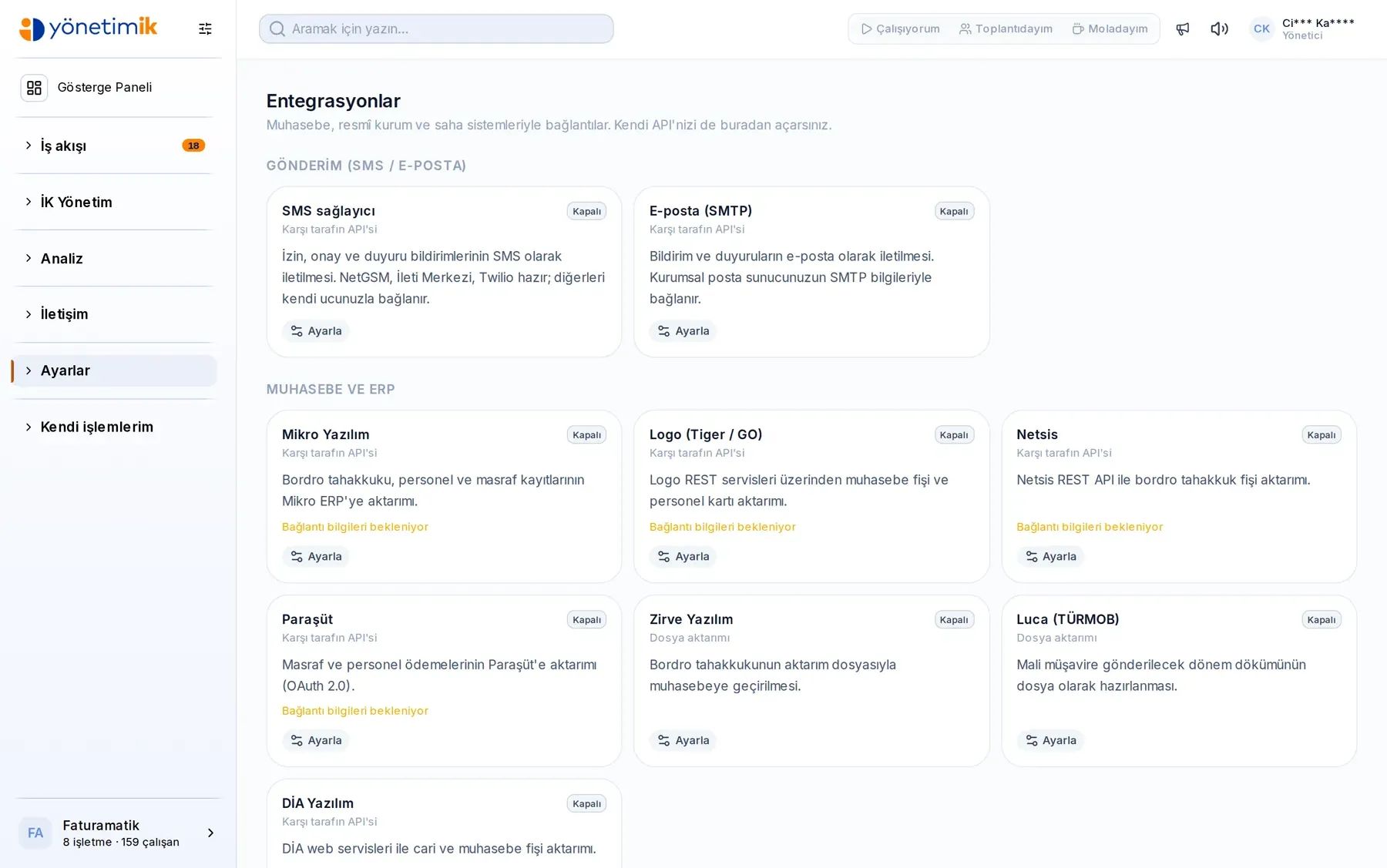
Jobs handed out verbally leave no trace. Open a work order, route it to the right person, and let the result come back as a photo and a document on the same record.
- Open an order in seconds from a template
- Routing and status tracking on one screen
- Completion note, photo and document on the same record
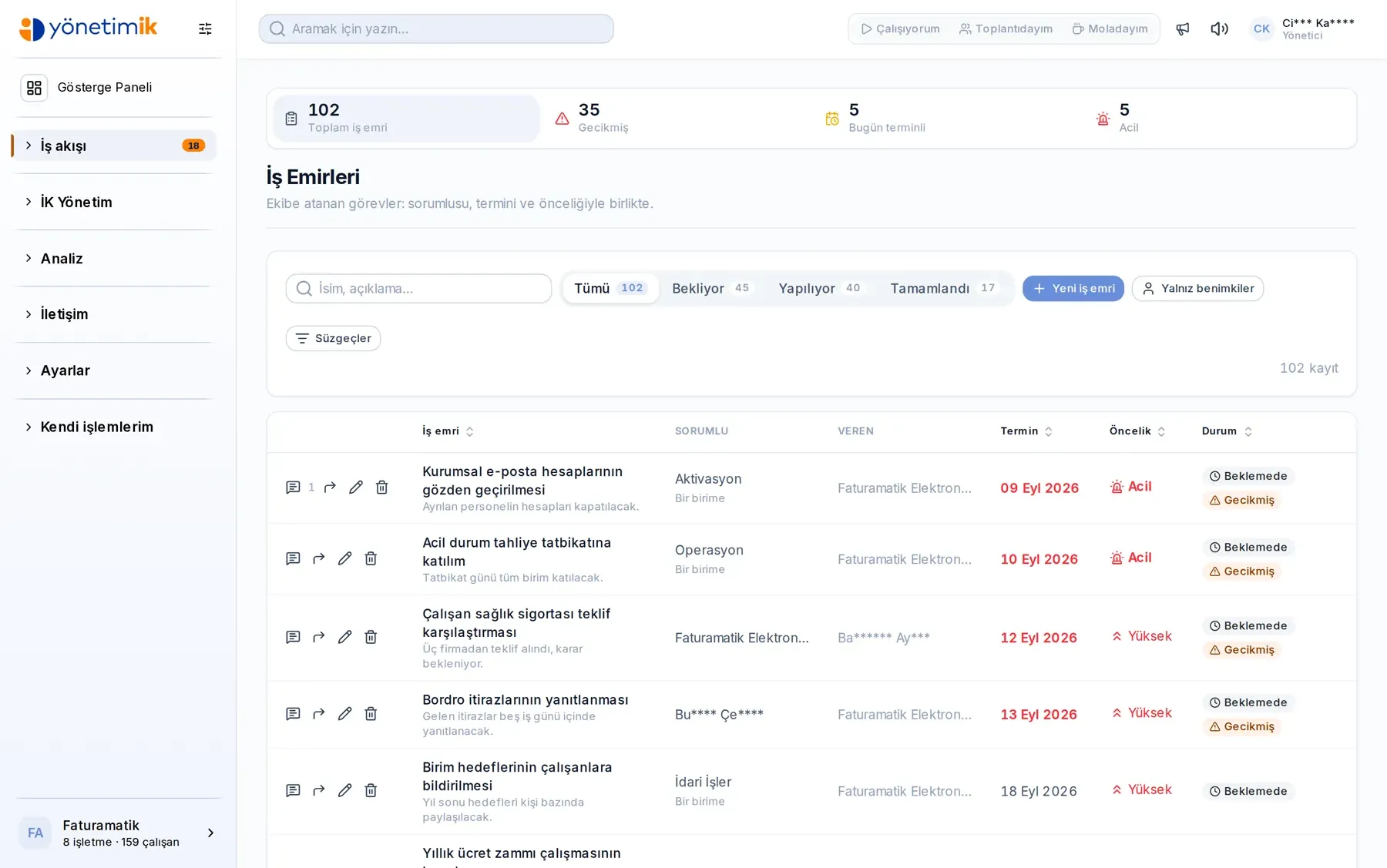
Attendance & Shifts
Who worked when, beyond dispute
Build the shift plan in the panel and import clock-in data. Overtime and missing days live in one place instead of hand-kept spreadsheets.
- Weekly and monthly shift plans
- Clock-in data imported from card systems
- Overtime and missing-day breakdowns
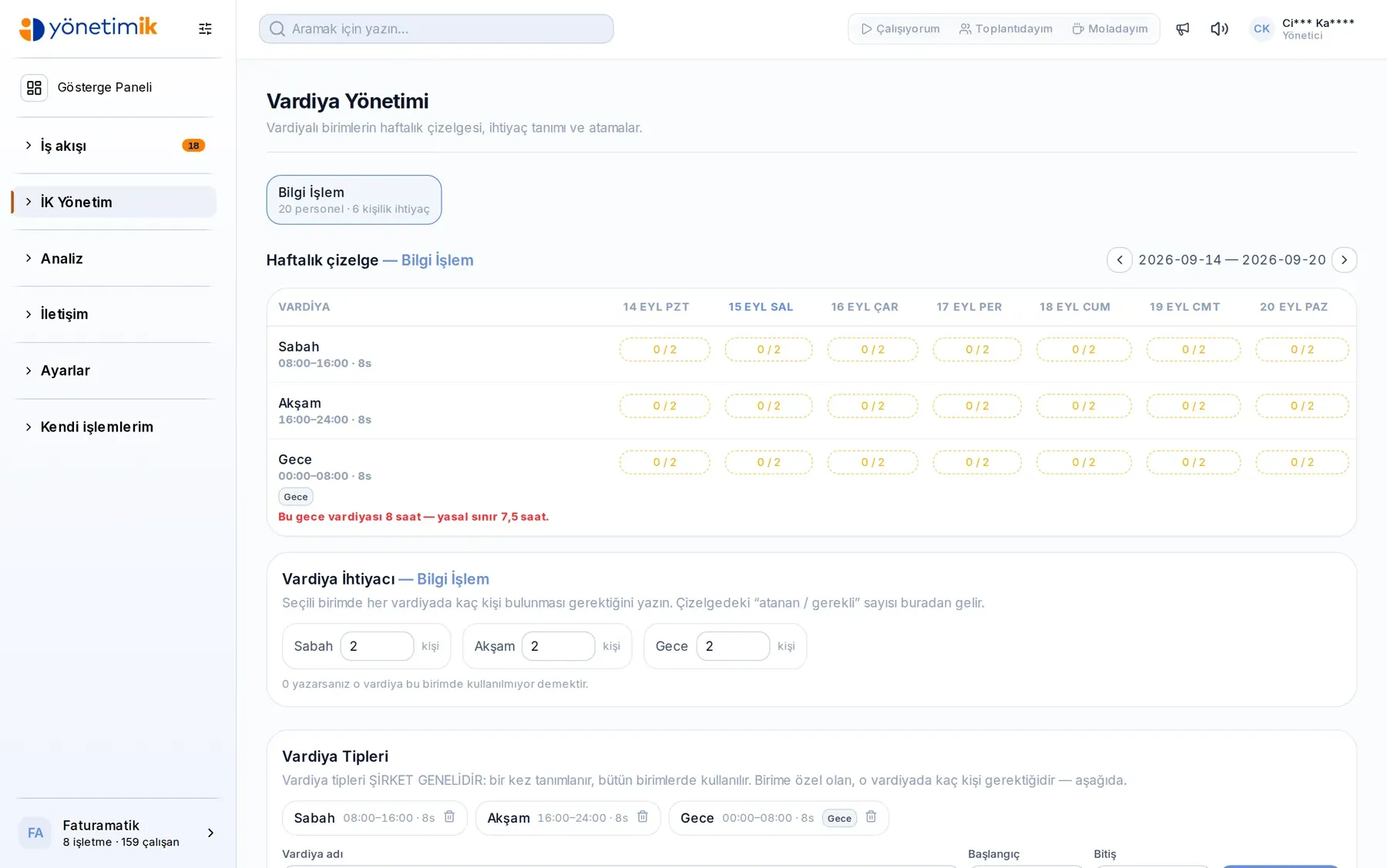
Daily Attendance
Where is the team today?
See it in the first glance of the morning: who arrived, who was late, who never clocked out, who exceeded their break. Click a counter and the list narrows to that group.
- Counters for late, no clock-out, break exceeded and no activity
- Step back day by day through past records
- Filter by unit and name, jump to the employee card in one click
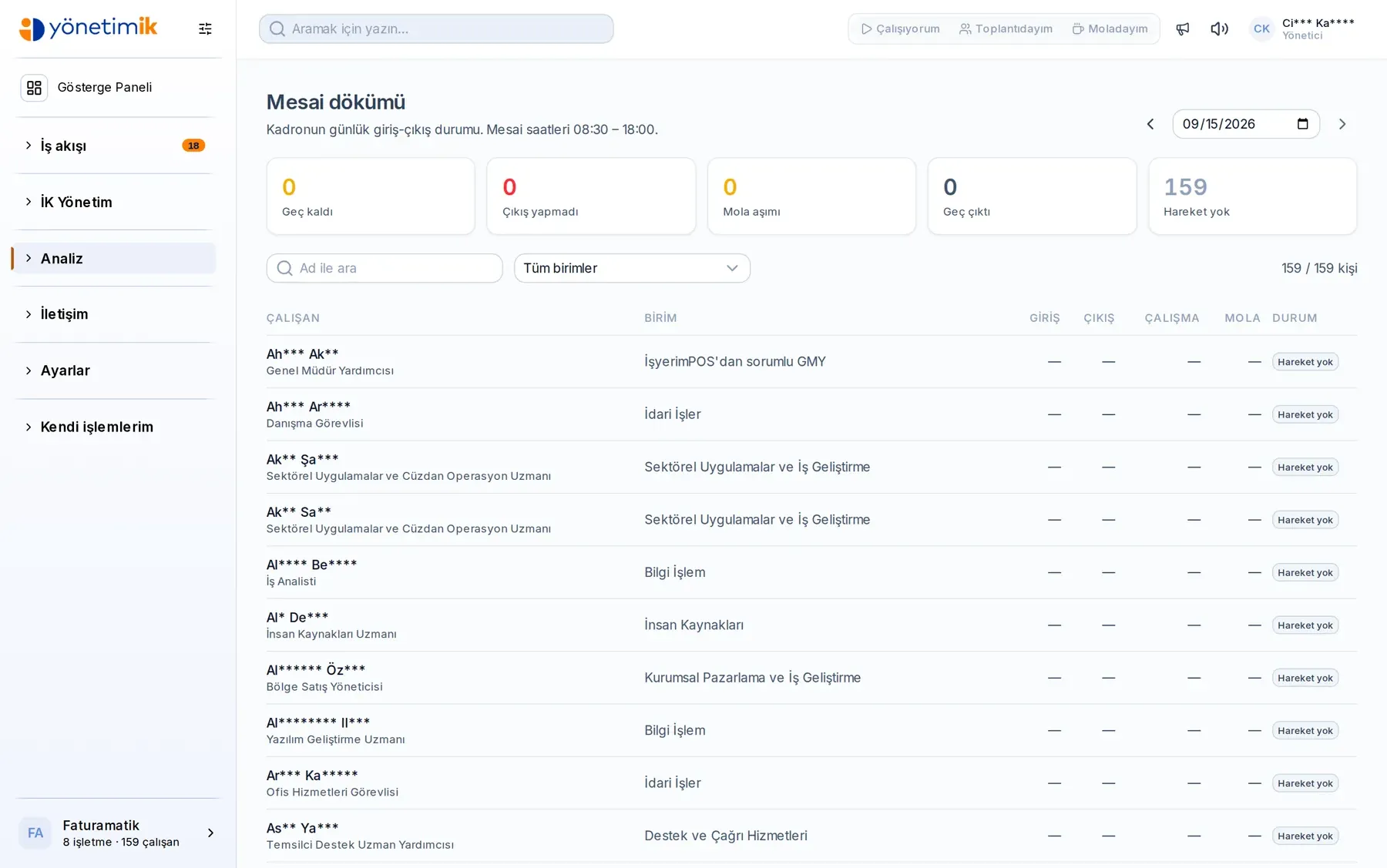
Integration Hub
It connects to whatever accounting you use
Connect without changing your software: their API, your own API, or a transfer file. How far each connection has come is written on the screen.
- Mikro, Logo, Netsis, Paraşüt, DİA, Zirve, Luca and more
- Ready period files for social security, tax office and banks
- Generate your own API key and watch the call log
All the Modules You Need
Fully integrated modules designed for every stage of your human resources processes.
- Employees & RecordsPersonnel files, company–branch–department structure and employment history on a single screen.
- Hiring & Talent PoolApplications land in one pool and are reviewed there; a hired candidate becomes an employee record in one step.
- Leave ManagementAnnual, unpaid and sick leave; the balance is calculated cumulatively from the start date to today.
- Attendance & ShiftsShift plans, overtime and clock-in data meet on the same screen.
- ExpensesAn expense is filed with a photo of the receipt and routed to the right manager by rule set.
- Salary AdvancesAdvance requests, limit rules and the deduction plan run in a single flow.
- PayrollPeriod payslips, deductions and benefit items; employees see their own payslip in the panel.
- Bonus & PerformanceBonus rules, targets and entitlement tracking; who earned what stays in the table.
- Work OrdersOne employee opens a work order for another employee or straight for a department; it lands in that person's panel by itself. Whoever does the job closes it with a note, a document and a photo, and whoever opened it follows the whole thing from the same screen.
- Assets & EquipmentVehicles, phones, laptops: who holds what, when it was issued and when it came back.
- Employee CardsMeal and fuel card top-ups, balances and person matching in one place.
- Training & ProceduresCompany procedures and training material sit in the employee's panel; you see who read and who finished.
- Surveys & AnnouncementsAnnouncements reach everyone, surveys collect the answer; participation shows instantly.
- Messaging & NotificationsIn-panel messaging, bulk sending and a notification sound — work talk stays next to the work.
- Chat — Internal MessagingEmployees and managers write to each other inside the panel, one-to-one or in groups. Work conversations stop scattering across personal phones: they stay in the company's own system, searchable and auditable.
- Manager Mobile AppApproval queue, team records and work orders on the phone. Managers decide without waiting to get back to the office, on exactly the same data as the panel — there is no second system.
- Employee Mobile AppLeave requests, a photo of the receipt, payslips and assigned equipment — one task per screen. Employees no longer need a computer, or a call to HR for every question.
- CalendarLeave, shifts, birthdays and company events gathered in a single calendar.
- Reports & AnalyticsHeadcount, absence, cost and request reports; read them on screen or take them out.
- Approval FlowLeave, expense, advance and overtime requests queue up together; the manager decides in the row.
- Rule Sets & SettingsYou define the leave, expense and advance rules; the panel runs on them.
- Attendance & Clock-inDaily clock-in status of the whole workforce on one screen: who arrived late, who never clocked out, who exceeded their break. Card-reader records and in-app statuses land in the same place.
- Integration HubConnections to accounting, government, banking and field systems in one place. Connect through their API, open your own API, or download the transfer file.
- Procedures & DocumentsCompany procedures, instructions and forms published in one place, with read tracking. Works together with the training module.
- Spending & Advance RulesWho can spend how much, on what? The rule is written once and the request screen follows it — it warns before a request is even created.
- Mobile Work OrdersField teams see work orders on their phone, change the status and create new ones. Incoming and outgoing orders sit in separate tabs, overdue ones flagged.
- Mobile Approval QueueLeave, expense, advance and profile-change requests in a single queue. The manager decides in the row; the result reaches the panel instantly.
INTEGRATION
It talks to the systems you already use
You do not have to replace your accounting software. Yönetim İK connects to your software and to government bodies in three different ways; you pick whichever fits.
- Mikro
- Logo
- Netsis
- Paraşüt
- DİA
- Zirve
- Luca
- SGK e-Bildirge
- GİB / Muhtasar
- İŞKUR
- Banka ödeme dosyası
- Kart okuyucu / PDKS
- Yemek kartı
- Kariyer.net
Our own API
Generate a key and share the address; your accountant or developer reads employees, units, leave, timesheets and payroll directly. Timesheets can be written back.
Their API
We connect to the institution’s own service: address, credential type and key are entered, and the connection is tested from the screen. The “connected” badge is only written after a successful test.
File transfer
For institutions without an API you download the period file: accounting accruals, social security and withholding statements, bank payment list, meal-card top-up. Opens in Excel.
ONE SYSTEM, TWO SCREENS
The same work on desktop and on the phone
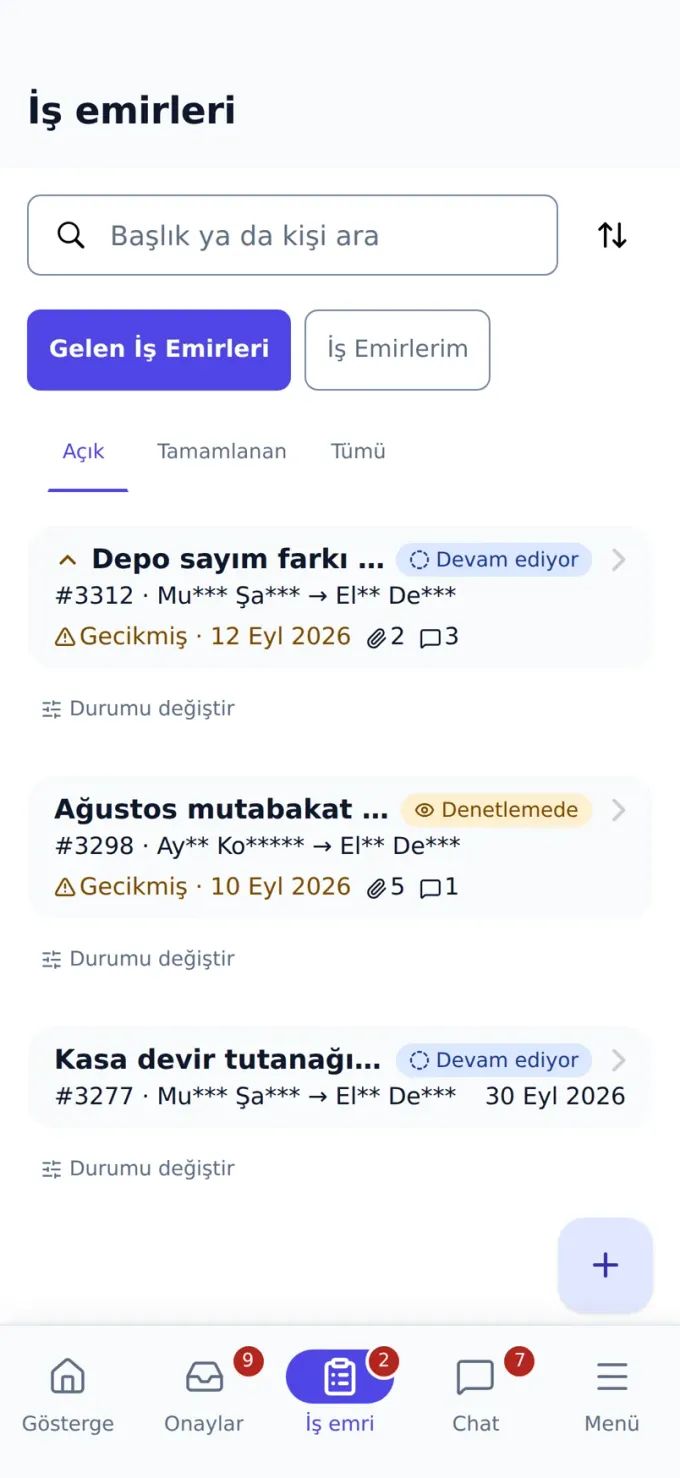
The mobile app is not a separate product: it takes its data from the panel, writes back to the panel and signs in through the panel. Below, the same module is shown on both devices side by side.
Web panel
Mobile app
The manager opens a work order in the panel, the field team sees it on the phone, changes its status and closes it. Overdue items carry the same warning on both screens.
One database
The record you see on the phone is the record you see in the panel. There is no sync, no export, no “mobile edition”.
One login
The same user code and password. The app takes its identity from the panel; you do not open a separate account.
The same permissions
A screen you cannot see in the panel is not visible on the phone either. The menu narrows by role and the rule lives on the server.
Mobile app
The whole panel in your pocket: manager and employee apps
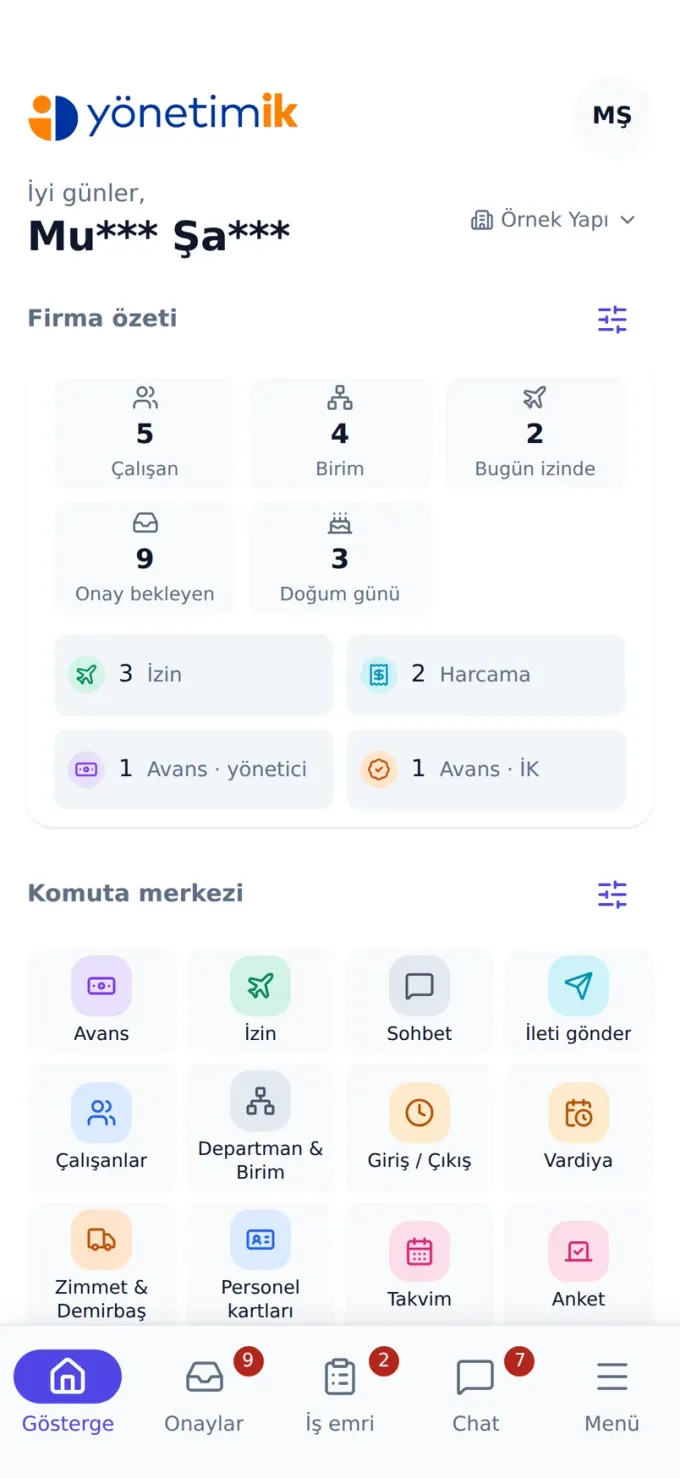
One app, two experiences. The screen is built around whoever signs in: a manager sees the approval queue and their team, an employee only their own requests. Anything done in the panel can be done on the phone, and the data stays in one place.
Manager app
Approval queue, team records and work orders — decide in the row instead of waiting to get back to the office.
- Approval queue: leave, expenses, advances and overtime in one list
- Manage incoming work orders; create new ones
- Route a work order to a person or a department and follow its status
- Employee records, leave balances and reports; chat and announcements
Employee app
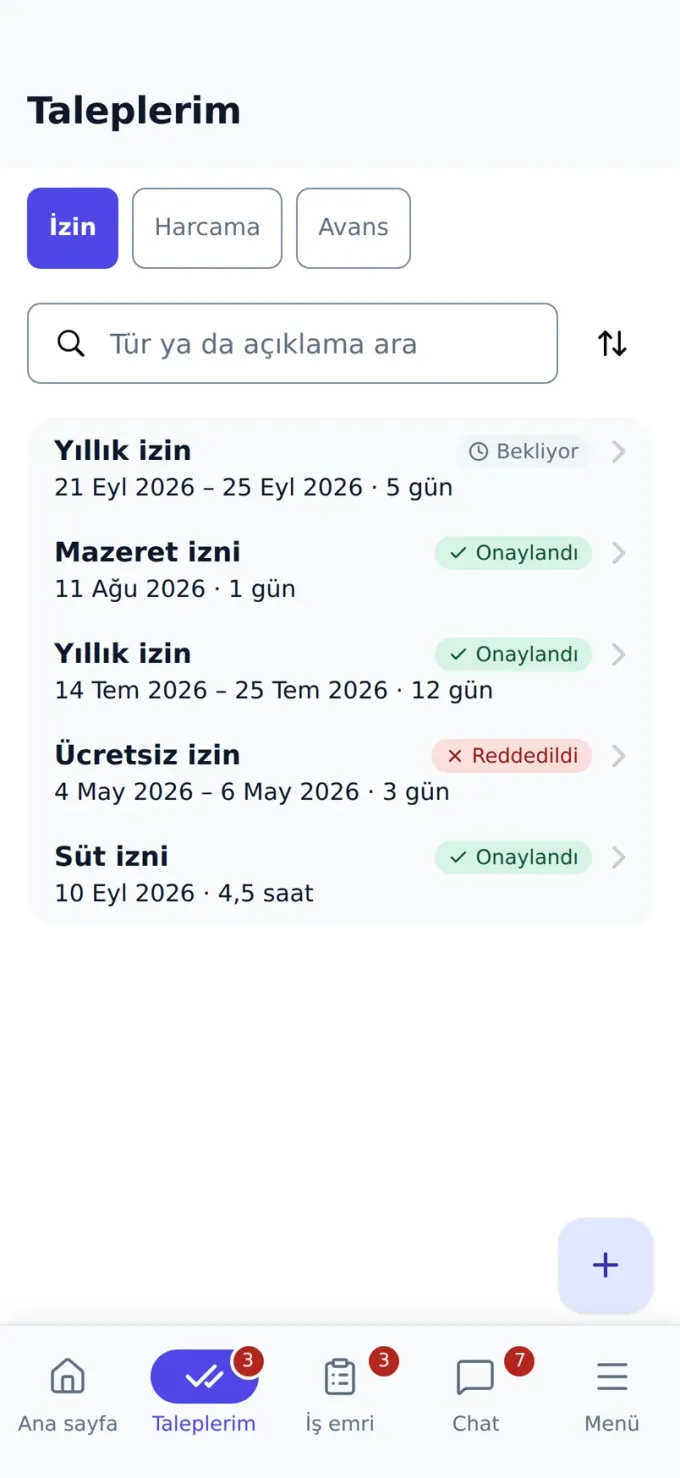
Request leave, photograph the receipt, check your payslip. One task per screen, nothing to learn.
- Leave, expense and advance requests with live status
- Handle the work order that reaches you from the phone, close it with a note and a photo
- Open a work order for a colleague or a department and follow it
- My assets, my payslip, my leave balance; chat, announcements and calendar
FROM INSIDE THE APP
What can you do on the phone?
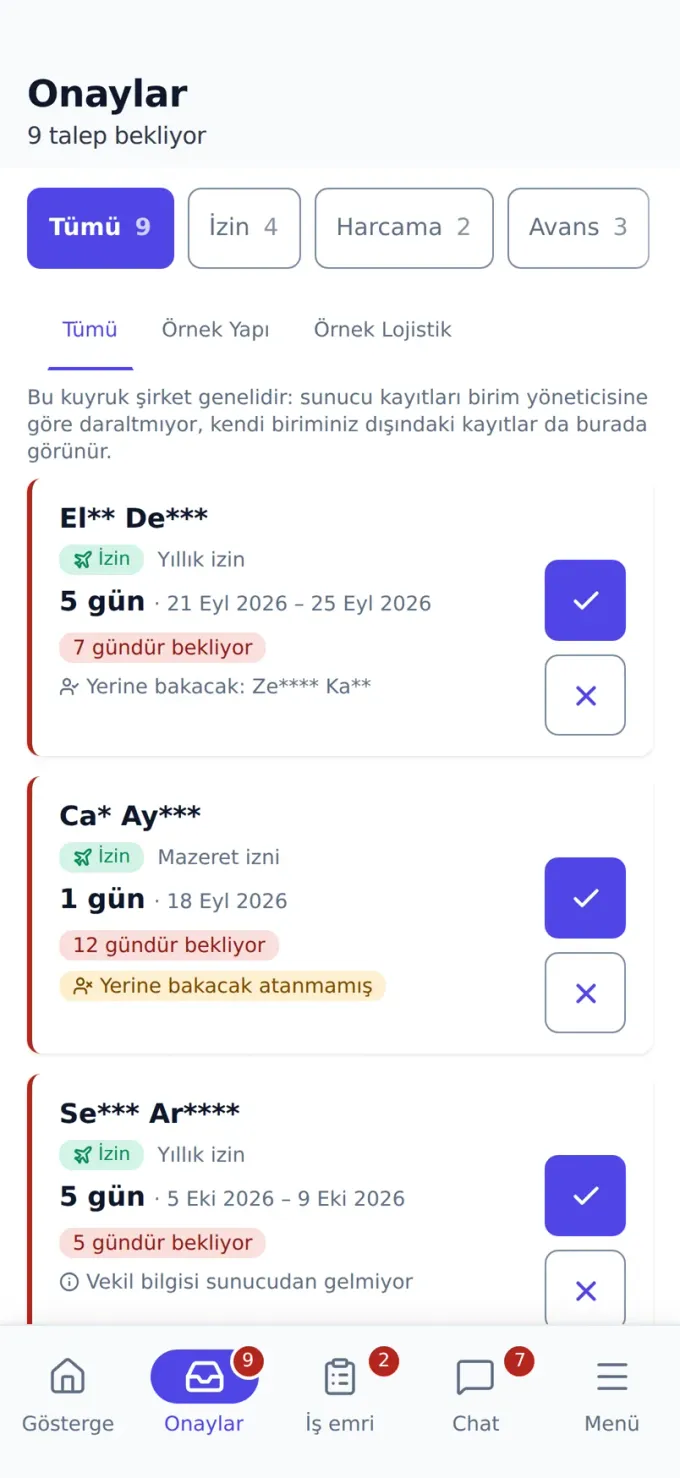
The screenshots below come from the app itself. Every module you open in the panel has a counterpart on the phone; your menu matches your permissions.
Dashboard
Pending approvals, today’s attendance and open work orders on one opening screen.
Approval queue
Leave, expense and advance requests in one list; decide in the row.
Work orders
Incoming and your own work orders, with overdue warnings.
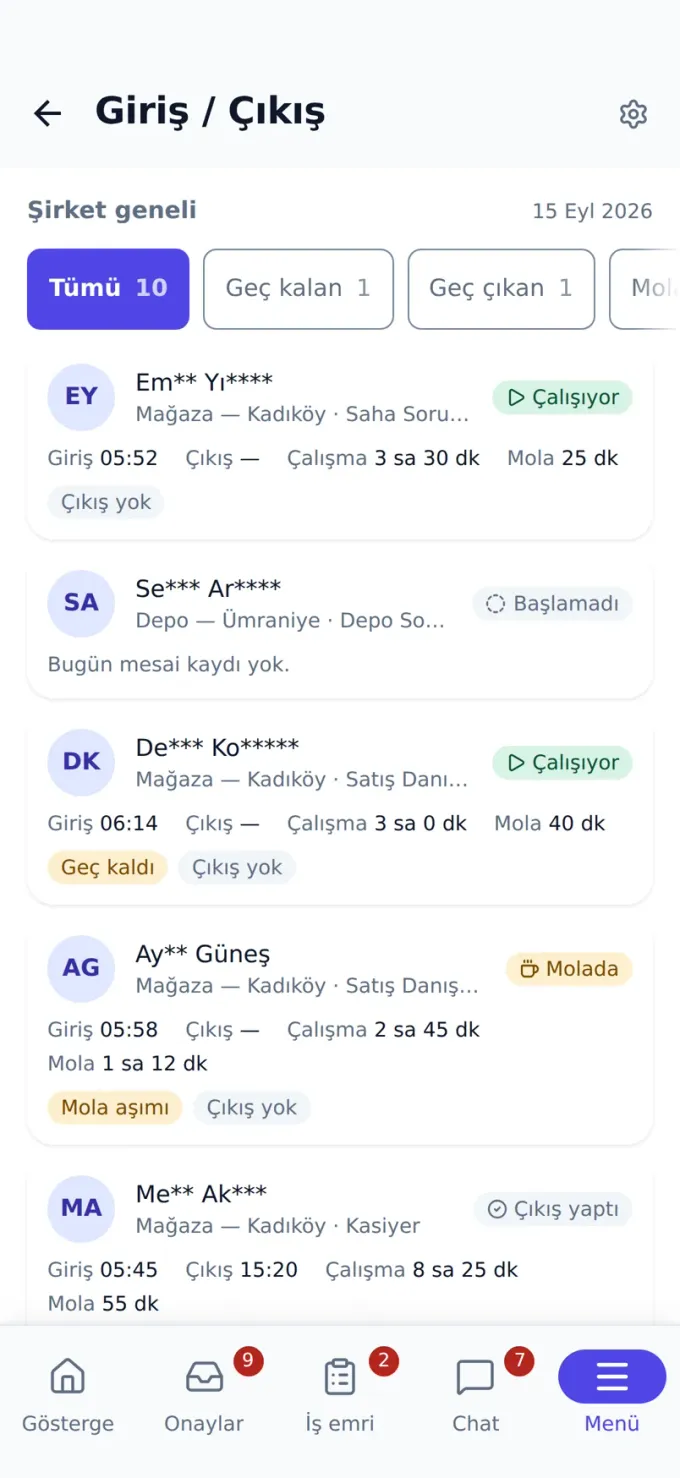
Clock in / out
Company-wide attendance: late, break exceeded, no clock-out.
My requests
Your own leave, expense and advance requests and their status.
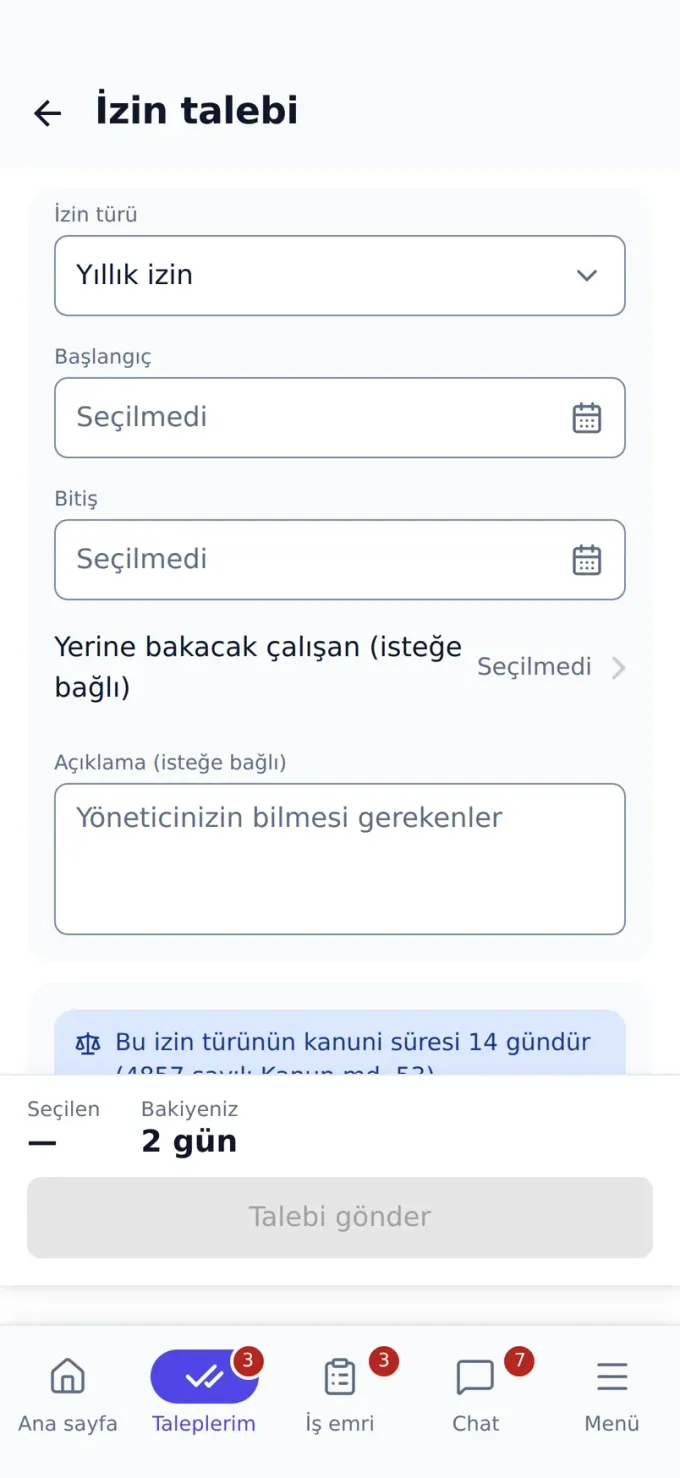
Leave request
Pick dates, pick a type, send; the balance is calculated instantly.
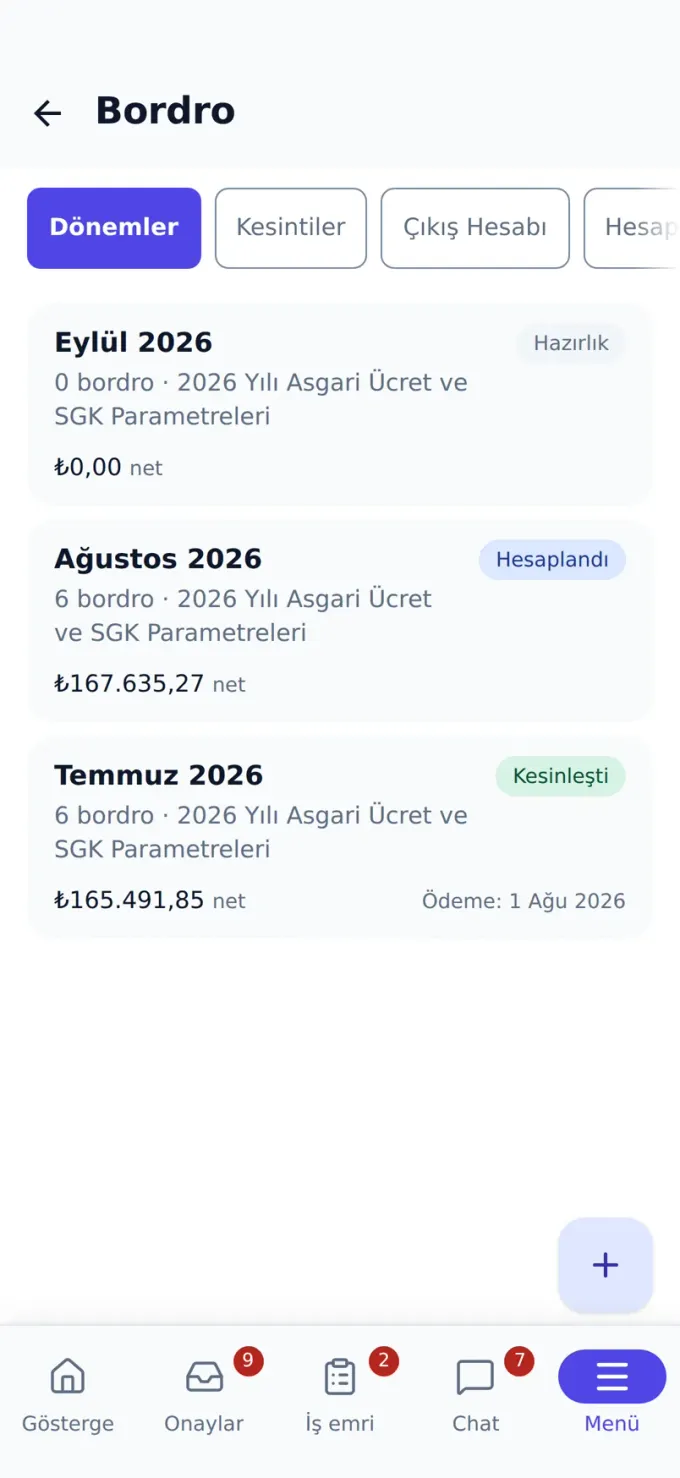
Payroll
Payroll periods, deductions and final settlement on the phone.
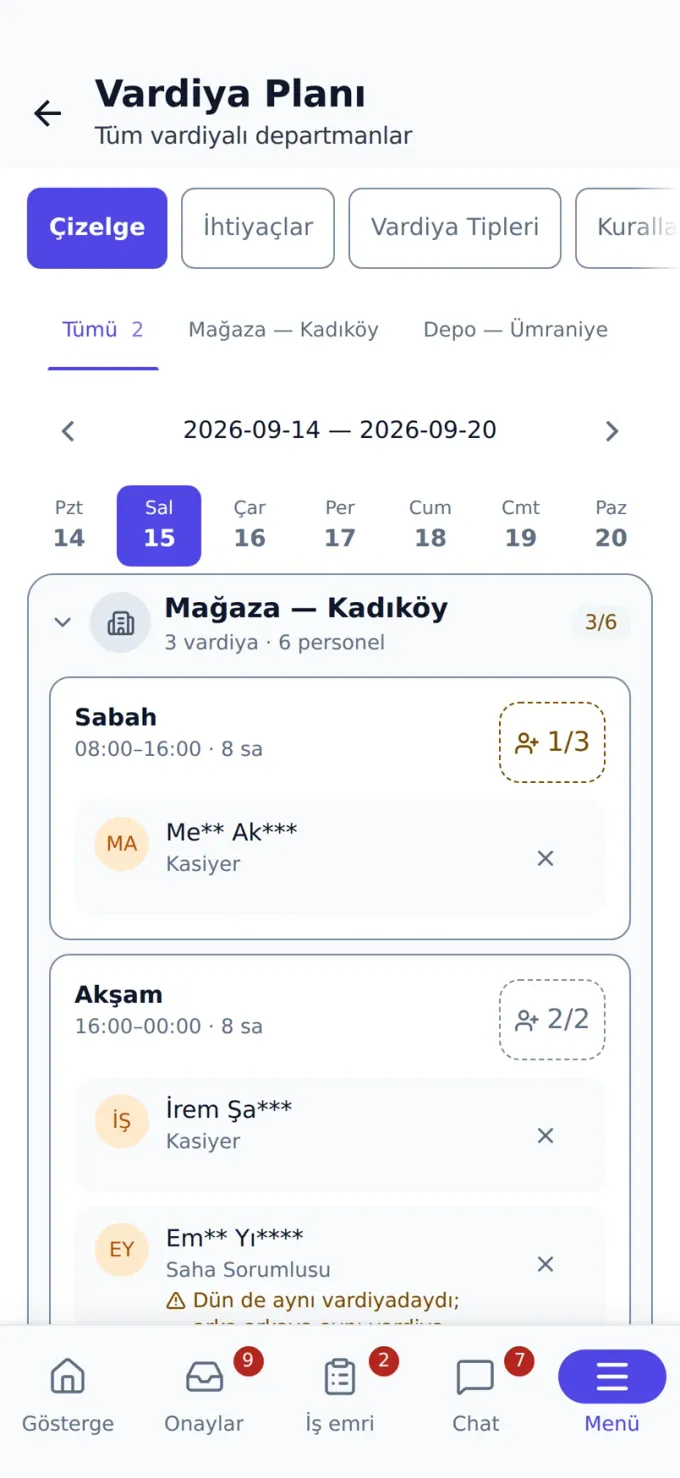
Shifts
Shift plan and assignments; legal warnings appear as you assign.
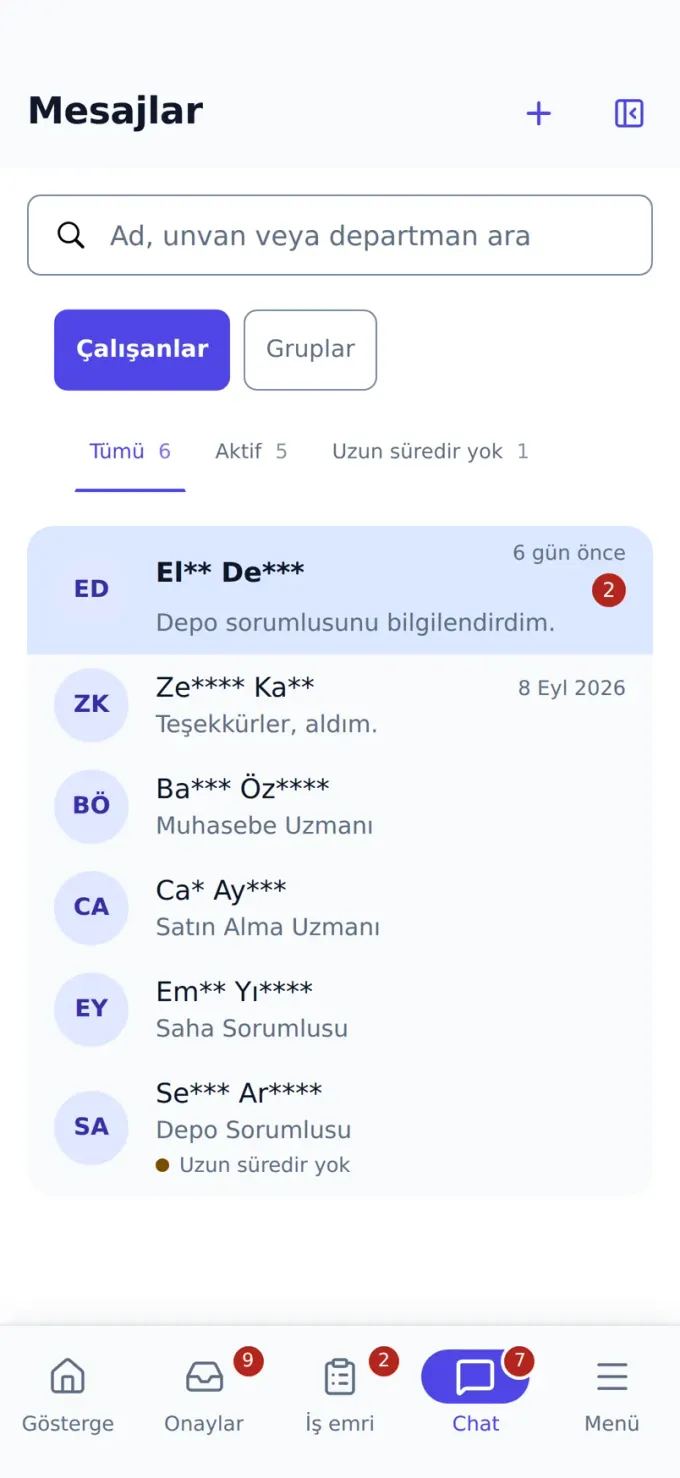
Chat
One-to-one and group messaging with file sharing.
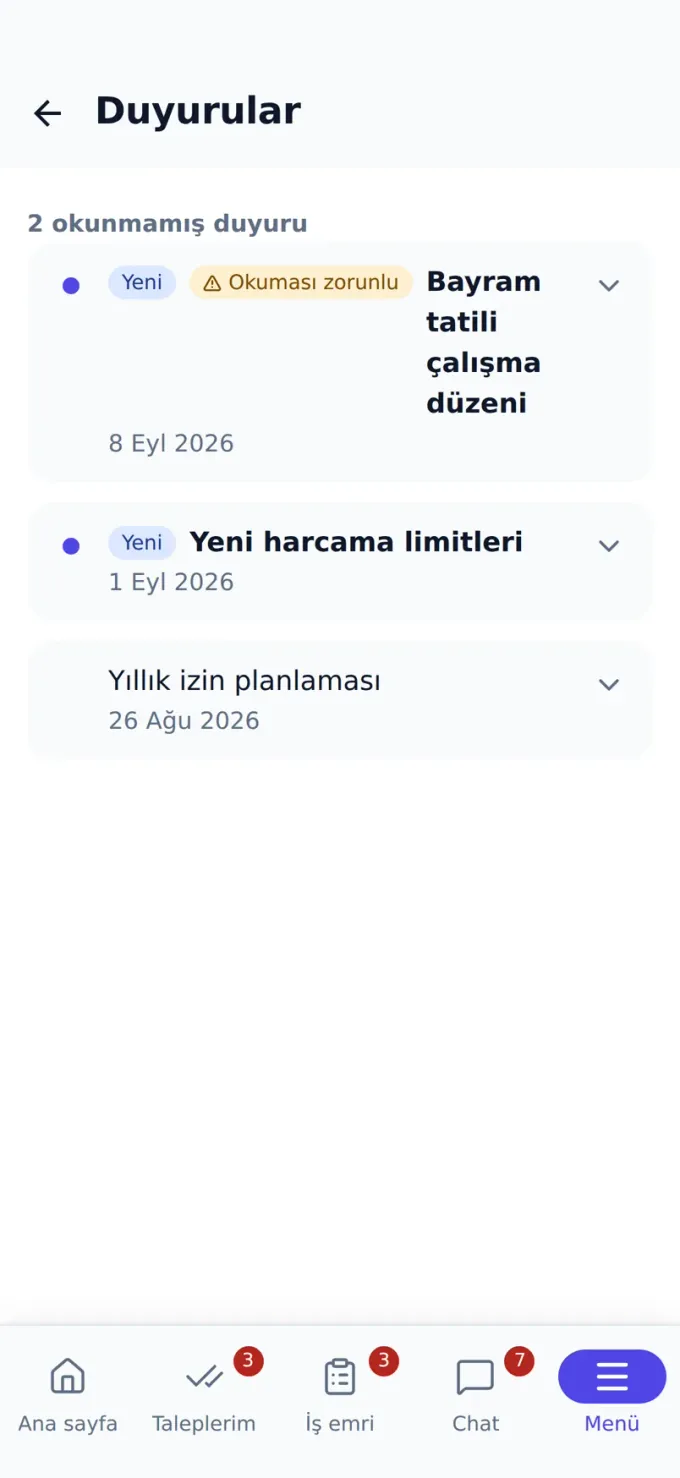
Announcements
Company announcements; mandatory ones are flagged.
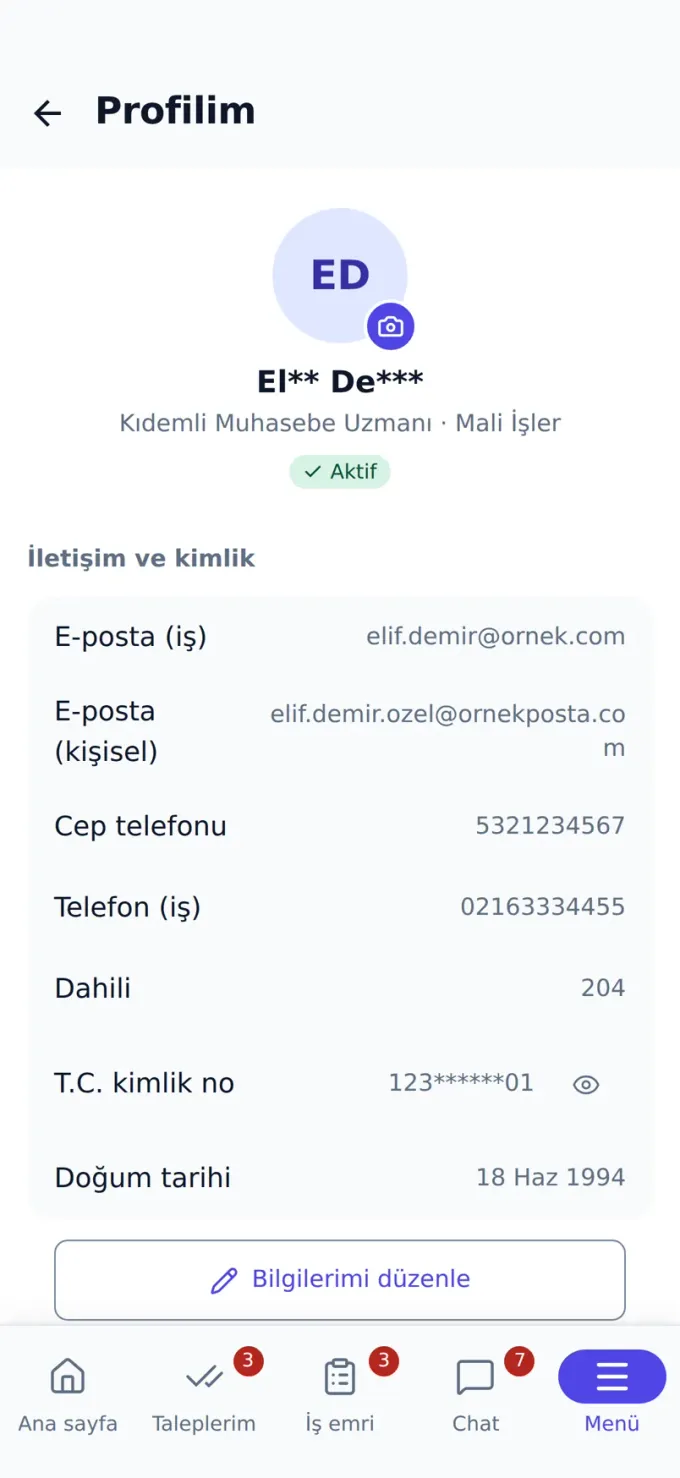
My profile
Personal records, contact-change request and active sessions.
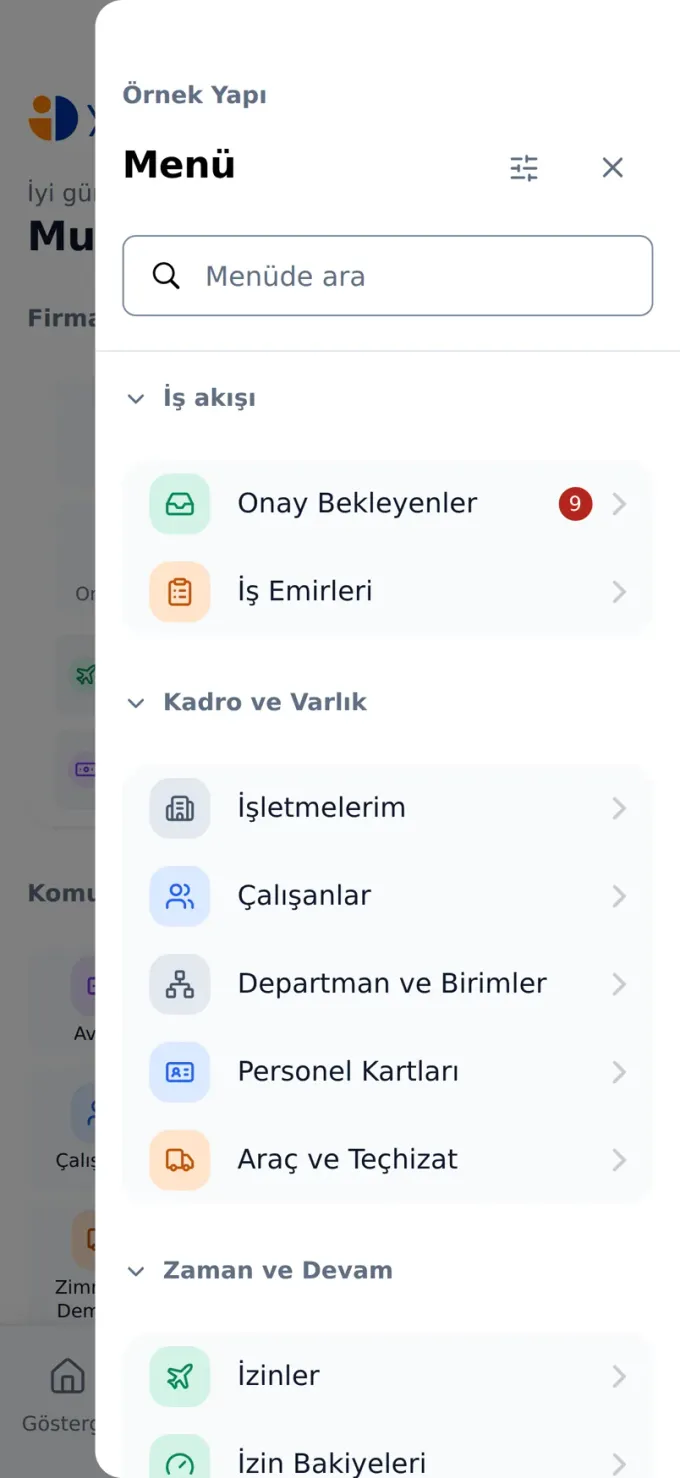
All modules
Whatever the panel has, the menu has — opened by permission.
One platform, complete coverage
What makes Yönetim İK enterprise software is the product itself, not a marketing promise.
- 27
- Integrated modulesEmployees, leave, attendance, expenses, payroll, work orders, shifts, training, integrations and the mobile app on one platform.
- 5
- Interface languagesTurkish, English, Russian, Arabic and Chinese, for multinational teams.
- 24/7
- Cloud accessNo installation required; reachable from anywhere through a web or mobile browser.
- KVKK
- Compliant infrastructurePersonal data is protected by role-based access and actions are logged, in line with KVKK, Türkiye's personal data protection law.
Security and compliance
Employee data is the most sensitive data you hold
The first question to ask when choosing HR software is where the data is held and how it is protected. Yönetim İK runs on role-based access, logged actions and infrastructure compliant with KVKK, Türkiye's personal data protection law.
Role-based access
Each user sees only the data they need to see; department and branch manager permissions are defined separately.
Audit trail
Approvals, rejections and changes are stored together with who made them and when.
KVKK compliance
Personal data is processed within the framework of Law No. 6698; disclosure and consent processes are supported.
How to get started
Not an implementation project, simply getting started
Yönetim İK is cloud-based; there are no servers to set up and no licenses to manage.
- 01
Request a demo
Fill in the form and our team will plan a walkthrough based on the size and needs of your organization.
- 02
Setup and data migration
Your company, branch, department and employee details are imported into the system, and permissions are defined.
- 03
Your team gets going
Your employees log in with their own accounts, and requests start flowing through the portal from day one.
Frequently Asked Questions
We have answered the most common questions about Yönetim İK for you.
Explore Our Articles
Up-to-date insights and guides from the world of human resources.

Employee Experience
What Is Employee Experience?
What is employee experience, which stages does it consist of, how does it differ from employee engagement, and what should HR do to improve it? A comprehensive guide.
July 9, 2026

Recruitment
Interview Techniques in Recruitment: How to Choose the Right Candidate
Structured interviews, competency-based questions, the STAR technique and the mistakes made most often. A practical guide to the interview techniques that help HR professionals choose the right candidate.
July 9, 2026
Work Models
Managing Remote and Hybrid Working Models
The differences between remote and hybrid working models, their advantages and challenges, and how to manage them from an HR perspective. Practical advice for protecting productivity, communication and employee engagement.
July 9, 2026
Mobile app
Add the mobile app to your phone
No installer to download: open the address in your phone's browser and add it to your home screen. It then opens full screen, with its own icon.
- iPhone: open in Safari → Share → “Add to Home Screen”
- Android: open in Chrome → ⋮ → “Add to home screen”
Your sign-in details are the same as the panel; no separate account needed.
Scan the QR code with your phone
 iPhone · iOS
 Android
 Huawei · HarmonyOS
Store releases are on the way. For now the code opens the app in your phone's browser, and you can add it to your home screen from there.
Digitize your HR processes today
Request a free demo and let's discover together how Yönetim İK adds value to your business.